Fjargoymsla (Veitingartíð til DK goymslu er 5-7 gerandisdagar)
Fjargoymsluvøra, veitingartíð til DK goymslu er 5-7 gerandisdagar. Eftir tað verður vøran send úr DK fyrstkomandi týsdag, og leverað í FO eftirfylgjandi týsdag. Meira kunning
Leveringsmuligheder - Vælges ved checkout
Heintast
ÓKEYPIS
Útbering.
60,00
DKK
7.345,00
Uttan MVG 5.876,00
Prísur við heinting í Tórshavn ella Klaksvík
7.345,00
Funktionen kræver at man er logget ind. Opret en bruger og brug vores smarte liste system til at holde styr på fremtidige indkøb, faste indkøb eller ønskelister. Opret bruger Login
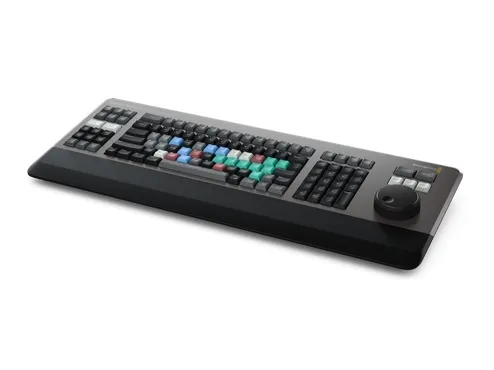
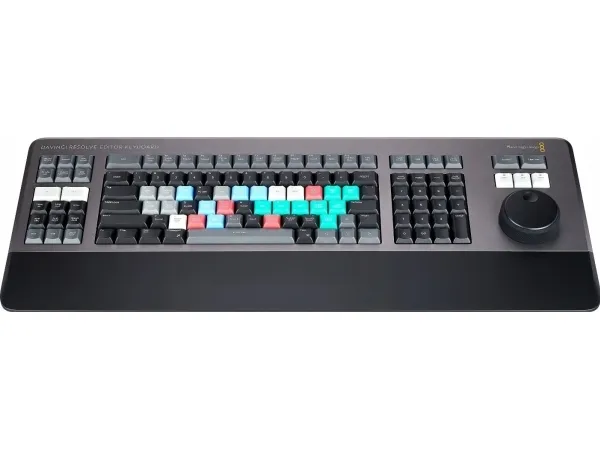
World's Best DaVinci Keyboard The new DaVinci Resolve Editor Keyboard also includes a revised QWERTY key layout that’s been updated using feedback from professional editors. However you still get all the traditional editing features for both the cut and edit pages in DaVinci Resolve, so the core QWERTY part of the keyboard still operates in a familiar way. All the standard edit modes are included on the main keyboard. Plus, you get JKL trimming when you want to do playback and trimming via the keyboard and not the search dial. But you still get new features in the revised layout, such as a viewer button to allow instant change to full screen view, and it’s even possible to edit from the keyboard in full screen view!
Search Dial Control with Clutch The integrated search dial is machined metal with rubber coating so it feels very nice to use and you always feel you have solid control over DaVinci Resolve’s clips or timeline. There's an integrated electronic clutch that creates end stops when used for shuttle and position, all under software control. With multiple roller bearings, the search dial is very smooth and it can be spun in jog mode to allow a natural timeline scroll. The jog control allows free movement for precise positioning of the playback point. Shuttle uses the clutch and you can rotate forward and reverse wind to move up and down the timeline. Scroll allows scrolling up and down a long edit to navigate quickly.
Direct Timecode Entry Keypad When entering edit points and durations numerically, there's a keypad specifically designed for timecode entry. The F/TC button allows switching between timecode or frames. Just press the F/TC button and enter changes to frames. When typing longer timecode values, there's also a double zero button so you don't have to press the standard zero key as often. The plus and minus keys allow time values as offsets to current values vs absolute entry. A dedicated duration entry button allows you to numerically define the duration of a clip. Numeric duration entry is one of the most used functions! For example, if you need to set a 100 frame duration on a clip, just press DUR, F/TC and 100!
Desktop or Inset into a Console! Although the DaVinci Resolve Editor Keyboard has been designed with a modern aesthetic, there's also function to the form! The subtle edge created between the top keyboard surface and the lower chassis has a streamlined feel to the design that allows the keyboard to look good on a desktop. Plus, the keyboard is a fantastic visual match to the latest computers that feature futuristic design. There's even fold out feet to increase the keyboard tilt! However the flange has a functional benefit as you can install the keyboard in a cutout of a desk or console. When mounted into a desk, the keyboard will sit perfectly flat to the desk surface. This creates an amazing console look!
Bin and Source Tape The full sized keyboard also features sorting keys to allow the source tape to be rearranged into different sort orders at the press of a button. You can sort the source tape by time, camera, duration or even clip name. The moment one of the bin sort buttons is selected, the source tape will be regenerated in that bin’s sort order. Simply scroll up and down the source tape to find the shots needed! Sort by timecode to see all the bin media sorted by time, which is perfect for content shot in time order, such as live events. You can also sort by camera which is great for multi camera shoots where you need to find cut aways on specific cameras. You can even sort by duration and the clip name!
Produktfarve
Sort, Grå
Produktet er kendt under følgende varenumre i vores system
EAN:
9338716006261
Hvorfor oplever jeg at den umiddelbart samme vare findes på forskellige varenumre?
Producenterne udgiver ofte den samme vare med forskellige varenumre, typisk handler det udelukkende om forskellige versioner af emballagen. Eksempelvis kan emballagen være målrettet forskellige lande.
Vi forsøger bedst muligt at samle varerne, men det kan opleves at den samme vare figurerer på forskellige varenumre i vores system.